When your JCB is down, a complete JCB Service Master fault codes list and manual reset guide is the most valuable tool in your arsenal. It lets you quickly figure out what's wrong, identify the likely cause, and often clear minor codes with a simple key cycle. This puts you back in the driver's seat, turning hours of frustrating downtime into just a few minutes of work.
Your Operator's Guide to JCB Faults

Let's get straight to it. This isn't about textbook theory. It's about that gut-wrenching moment when your dash lights up like a Christmas tree and your machine grinds into limp mode right in the middle of a job. We're focused on real problems that happen on real sites, where every single minute your "Yellow Iron" sits idle costs you money.
The dealer wants you to think every blinking light is a catastrophic failure that only their proprietary "Dealer Laptop" and a hefty service call can fix. The reality? Many of these faults are simple issues you can diagnose and fix yourself right there in the field, as long as you have the right know-how.
Ditching the Dealer Mindset
That dreaded "Regen Required" or "Engine Derate" message is often just a symptom of a much smaller problem. More often than not, it's triggered by a faulty sensor or a clogged filter, especially with the finicky AdBlue/DEF systems JCB uses. The dealer's default solution is to hook up their Service Master laptop, run a long diagnostic, and then make you wait for a part. Our approach is different.
"A fault code isn't a diagnosis. It's just a clue. The dealer treats it like a final verdict that locks you out of your own machine. A seasoned field tech sees it as the first step in the hunt."
To get your machine running, you need to think like a technician, not a customer waiting for a tow. Understanding the difference between a real mechanical problem and an electronic ghost is the first step toward taking back control. But before you even touch a wrench, it's absolutely critical to review basic JCB safety protocols to keep yourself and others safe while you troubleshoot.
Dealer vs Field Technician Approach to JCB Fault Codes
Here's a quick comparison of the typical dealer process versus the hands-on, get-it-done approach we take in the field.
| Problem | Dealer's First Response | Field Technician's First Response |
|---|---|---|
| "Engine Derate" Code | "We need to schedule a service call to connect our diagnostic tool." | "What were the conditions? Let's check the DEF level, fuel filters, and look for obvious sensor issues." |
| "Regen Required" Alert | "Don't touch anything. We'll send a tech to force a regeneration cycle for a fee." | "Is the exhaust getting hot enough? I'll try a parked regen first. If that fails, I'll check the soot sensor and the NOx sensor." |
| "Hydraulic System Fault" | "It could be a major pump failure. We'll have to tow it to the shop." | "Let's check the hydraulic fluid level and filter first. Is there any sign of a leak or a loose connection on a solenoid?" |
This guide is built for the operator in the cab who needs to get that machine moving again—now. It's designed to give you a practical mindset for tackling any fault code that comes your way:
- Identify the Code: Quickly figure out what the machine is actually trying to tell you.
- Diagnose the Cause: Pinpoint the most likely culprit, whether it's a bad sensor, a loose wire, or just a dirty filter.
- Fix the Problem: Get back to work faster by bypassing the dealer wait times.
- Reset and Go: Perform a manual reset to clear the code and confirm the fix worked.
We're here to help you master your machine's electronics, not be held hostage by them.
How to Interpret the JCB Fault Code System
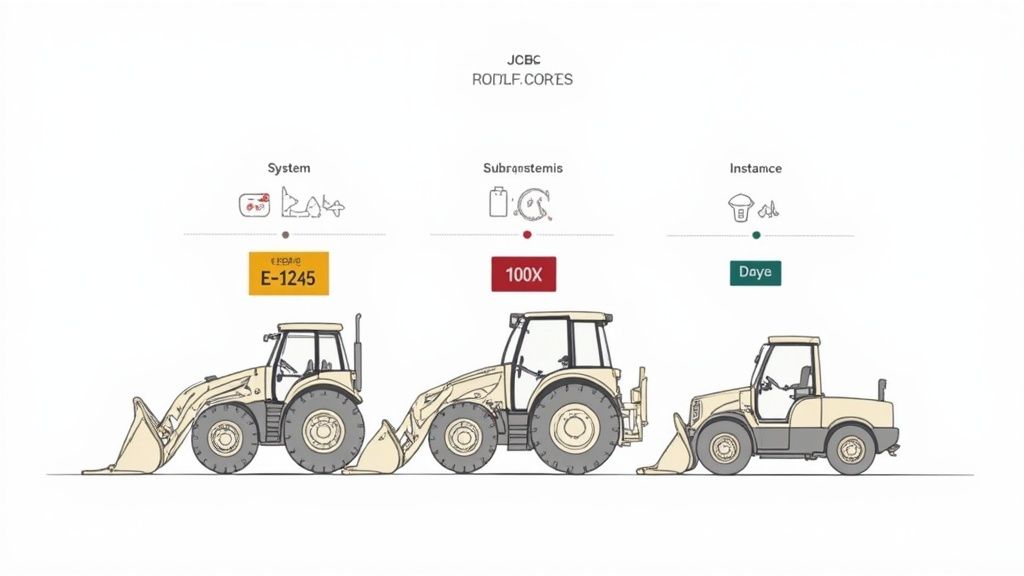
Before you can bust out the wrenches and get your machine back in the dirt, you need to speak its language. A JCB fault code isn’t just a random number; it's a direct message from the machine’s electronic brain—the ECU—pinpointing exactly where it hurts. Think of it like a coordinate on a map, leading you straight to the source of the trouble.
These codes are your best weapon against downtime. They slice right through the guesswork and save you from tearing apart a perfectly good hydraulic system when the real problem is a cheap sensor that’s gone bad.
Breaking Down the Code Structure
JCB codes aren't just thrown together; they follow a logical pattern that tells you which system is acting up. While the exact format might change a little between a backhoe and a telehandler, the principle is always the same. It's built to get you pointed in the right direction, fast.
A typical fault code breaks down into a few key parts:
- System Identifier: This is usually a letter or number that points to a major system, like ‘E’ for Engine or ‘H’ for Hydraulics.
- Subsystem Identifier: This narrows it down, telling you which part of that system is screaming for help—like the fuel delivery circuit within the engine system.
- Specific Fault Number: The last digits get right to the point, identifying the exact issue, such as "low voltage" or "signal out of range."
This structure is completely intentional. It allows a technician (or a savvy operator) to quickly triage the problem. For example, a code starting with a "U" almost always points to a communication breakdown between different electronic modules—a classic CAN bus gremlin that can be a real headache without that clue.
Active vs. Stored Codes
When you pull your fault log, you’ll see two kinds of codes: active and stored. Knowing the difference is critical. It’s what separates a quick fix from a wild goose chase that wastes half your day.
An active code is a live problem. The ECU is seeing the fault right now. A stored code is a ghost—a problem that happened in the past but might not be there anymore. It’s the electronic scar from a previous battle.
Intermittent electrical issues, like a chafed wire that only shorts out when you hit a big bump, love to leave behind a trail of stored codes. This history is invaluable. If you see the same code logged ten times in the last 50 hours, you know exactly where to start hunting for that pesky gremlin. Ignoring stored codes is a rookie mistake that guarantees the problem will come back to haunt you.
The evolution of these diagnostic systems has been rapid. Detailed JCB ServiceMaster fault code lists have helped cut diagnostic errors by an incredible 50% since 2015, with over 1,200 unique codes now cataloged for modern machines. Data from Europe shows that 32% of faults are tied to actuator issues that can often be reset manually once the repair is confirmed, a simple step that significantly boosts machine uptime. For a deeper dive, you can explore a detailed overview of JCB fault code systems to see just how far the diagnostics have come.
The Complete JCB Service Master Fault Codes List
Alright, let's get down to brass tacks. This is the page you’ll want to bookmark on your phone—the one reference that can save you a frustrating call to the dealer. Forget vague dashboard warnings and the usual runaround. We've put together a field-tested JCB Service Master fault codes list designed for the person in the cab, not the one behind a service desk.
We’re not just dumping a bunch of numbers on you. We'll give you the code, explain what it actually means in plain English, and point you to the most likely culprits—which, more often than not, is just a cheap sensor or a chafed wire. We’ve broken it down by the systems that cause the most headaches: Engine, After-Treatment (that dreaded AdBlue/DEF system), Transmission, and Hydraulics. Start here before you even think about hauling your machine back to the shop.
JCB Engine and After-Treatment Fault Codes
This is ground zero for most of your downtime. The modern JCB engine is a powerhouse, but it's wrapped in a complex web of sensors and emissions controls that are notoriously finicky. When your machine derates or gets stuck in an endless regen loop, one of these codes is almost always the cause. The dealer might tell you it's complicated; we'll tell you to check the NOx sensor first.
These codes often show up in pairs or groups. For example, a DEF quality sensor fault (P20EE) is frequently followed by a derate code (P1C54). Don't get overwhelmed by the list of alarms. The first code is the clue; the others are just the machine protecting itself. Fix the root cause, and the rest will usually clear right up.
You've got to treat these after-treatment systems like a grumpy old man. Keep the DEF fluid clean, the filters fresh, and don't ignore the first sign of trouble. If you do, it'll shut you down at the worst possible time, every single time.
Common JCB Engine and After-Treatment Fault Codes
Here's a quick lookup for the most frequent—and frustrating—engine-related fault codes that will stop you in your tracks. This table cuts through the technical jargon to tell you what the machine is trying to say and where to start looking.
| Fault Code | System | Plain English Description | Common Causes |
|---|---|---|---|
| P2201 | After-Treatment | NOx Sensor Signal Out of Range (Bank 1) | The NOx sensor is either dirty, failing, or its wiring is damaged. This is a top-tier suspect for nearly all regen and DEF issues. |
| P20EE | After-Treatment | SCR NOx Catalyst Efficiency Below Threshold | The system thinks the DEF isn't cleaning the exhaust properly. This can be a bad NOx sensor, a clogged DEF injector, or poor-quality AdBlue fluid. |
| P1C54 | After-Treatment | SCR System Inducement - Engine Derate | This isn't the problem; it's the punishment. The ECU has detected a serious emissions fault (like P20EE) and has cut engine power to force a repair. |
| U029D | After-Treatment | Lost Communication With NOx Sensor 'A' | The ECU can't get a signal from the NOx sensor. Check the wiring harness for breaks or corrosion at the connector before you condemn the sensor itself. |
| P0191 | Engine / Fuel | Fuel Rail Pressure Sensor Range/Performance | The ECU is seeing erratic pressure in the fuel rail. This is often a failing sensor, but can also point to a clogged fuel filter or a weak lift pump. |
| P0087 | Engine / Fuel | Fuel Rail/System Pressure - Too Low | Your machine is starving for fuel. Start with the easiest fix: change your fuel filters. If that doesn't work, inspect the fuel pump and pressure sensor. |
Remember, you don't need a dealer to replace a sensor. You can get quality replacement NOx sensors and DEF pumps from Flat Earth Equipment and install them yourself in under an hour.
JCB Transmission and Drivetrain Faults
Transmission codes can be scary, often flashing warnings about high temperatures or pressure faults. But don't panic. While internal clutch pack failures can happen, 90% of transmission electronic faults are due to a bad solenoid, a faulty speed sensor, or low/dirty oil. The machine’s computer relies on these inputs to shift correctly, so a bad signal can cause complete chaos.
Before you start pricing out a new transmission, check the basics. Is the oil level correct? Is the wiring to the transmission control unit secure? More often than not, a simple pressure sensor or speed sensor is all it takes to solve what seems like a catastrophic failure.
Common Transmission Codes
- T072 - Transmission Output Speed Sensor No Signal: The TCU has no idea how fast the machine is moving. This will cause erratic shifting or lock the transmission in a single gear (limp mode). Check the sensor and its wiring for damage.
- T121 - Forward High Solenoid Circuit Open: The electrical circuit to the solenoid that engages a forward gear is broken. This is almost always a failed solenoid coil or a simple break in the wire leading to it.
- T135 - Transmission Oil Temperature High: The oil is overheating. This could be from a low fluid level, a blocked cooler, or operating under extreme load for too long. Stop and let it cool down before you do real damage.
- T056 - Powershift System Pressure Low: There isn't enough hydraulic pressure to engage the clutches properly. Check the transmission fluid level first, then inspect the transmission charge pump and pressure sensor.
These parts are designed to be replaced in the field. A good set of wrenches and a replacement solenoid from a reliable supplier like Flat Earth Equipment can save you thousands compared to a dealer's rebuild quote.
JCB Hydraulic and Electrical System Gremlins
Hydraulic and electrical codes are often the most frustrating because they can be intermittent and hard to trace. However, most of these issues boil down to three things: low voltage, a bad sensor, or a communication breakdown on the CAN bus network. Think of the CAN bus as the nervous system of your JCB; if one component starts "shouting" bad data, it can confuse the whole machine.
When you see a "CAN bus error" or a code like U0073 (Control Module Communication Bus 'A' Off), don't immediately assume the ECU is fried. The most common cause is a single bad sensor or a damaged section of the main wiring harness. Your first step should always be a visual inspection of all exposed wiring, especially around pivot points and areas that collect debris. A multimeter is your best friend here for checking continuity and voltage at key sensors.
A weak battery or corroded terminals can also trigger a cascade of seemingly unrelated electrical faults. Before you dive into the wiring diagrams, make sure you have a solid 12.6 volts at the battery and that all connections are clean and tight. It's the simplest check you can do, and it solves more problems than you'd think.
Manual Reset Procedures to Get Back to Work
Alright, you've done the hard part. You tracked down the fault code, swapped out the bad sensor, and everything's bolted on tight. So, what’s next? You have to let the machine's brain know the problem is fixed. This is where a manual reset saves the day—and your wallet—by helping you avoid a pricey service call just for a technician to plug in his laptop.
For a lot of minor, non-critical faults, the fix is as simple as a "key cycle reset." It's the oldest trick in the book for a reason: it often works. By shutting the machine down completely, waiting a good 30-60 seconds for all the modules to fully discharge, and then firing it back up, you’re forcing the ECU to re-scan all its sensor inputs. If the problem is truly gone, the active code will usually disappear on its own.
Beyond the Basic Key Cycle
Let's be real, though—JCB electronics aren't always that forgiving. For those stubborn codes, especially anything related to the after-treatment system, you’ll likely need a more specific sequence. This usually means diving into the machine’s built-in monitor or instrument cluster.
The exact steps can vary a bit between models (a 3CX backhoe menu isn't the same as a 535-95 telehandler's), but the general process is pretty consistent:
- Access the Service Menu: This often involves holding a specific combination of buttons while turning the key or punching in a simple factory code.
- Navigate to the Fault Log: Look for the section listing active or stored Diagnostic Trouble Codes (DTCs).
- Initiate the Clear Command: You'll find an option like "Clear All" or "Erase Faults." Select it and confirm.
- Perform Another Key Cycle: After clearing the codes, do one more full key cycle to make sure the ECU locks in the change.
Following this procedure lets you wipe the slate clean after a repair. It's also great for clearing out old, stored codes that can clutter up the system and make future diagnostics a headache.
Hard Codes vs. Soft Codes
It's absolutely critical to understand that you can't just clear your way out of a genuine mechanical failure. Codes come in two main flavors:
- Soft Codes: Think of these as temporary glitches. Maybe a sensor gave a funky reading for a split second due to a voltage spike. These can almost always be cleared with a key cycle or manual reset.
- Hard Codes: This is an active, persistent problem. If you clear a hard code and it pops right back up, the machine is screaming at you that the issue is still there. The ECU is detecting the fault in real-time, and no amount of resetting will help until the broken part is replaced.
Trying to repeatedly clear a hard fault without fixing the root cause is like hitting snooze on a fire alarm. The problem isn't going anywhere, and you're just delaying an inevitable shutdown while risking more damage.
Knowing how to perform a manual reset is a vital skill. In North America, where JCB holds a solid 12% of the backhoe market share, their ServiceMaster software was used to reprogram 45,000 engines to boost efficiency. However, audits show that just clearing codes without a proper fix can lead to 14% repeat faults when the underlying issues are ignored. For a deeper look at the software's capabilities, you can explore the diagnostic tools available. Getting the right sensors from Flat Earth Equipment is the first step; knowing how to properly reset the system is how you finish the job right.
Troubleshooting Common JCB Fault Categories
Alright, let's move past the theory and get our hands dirty. When a fault code pops up on the job site, you're not getting paid to stare at a dashboard. This is your no-nonsense guide to diagnosing and fixing the most common issues that plague JCB equipment.
We'll be focusing on the big three that cause the most headaches: the notoriously temperamental AdBlue/DEF/SCR systems, stubborn hydraulic faults, and those electrical gremlins that love hiding in the CAN bus. Forget the dealer's vague advice; we’re giving you a direct, step-by-step process to get that machine earning again. For each category, you’ll get a real-world diagnostic checklist, a list of essential tools, and a heads-up on which parts fail the most.
Before you tear anything apart, always start with the simplest fix. A quick key cycle can often clear minor electronic glitches. If the code comes right back, you've got a hard fault that needs a real repair.
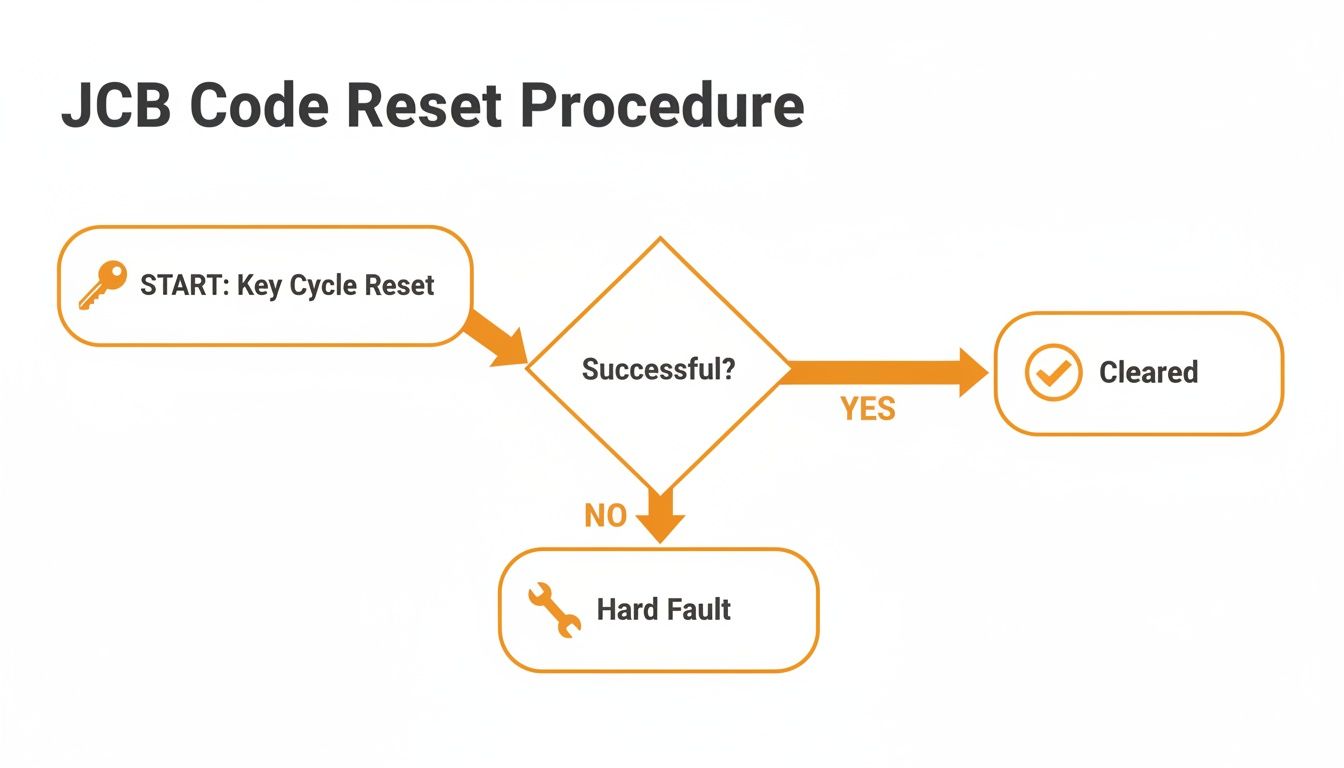
This simple decision tree shows how that initial key cycle immediately tells you whether you're dealing with a temporary glitch or a persistent problem.
AdBlue DEF and SCR System Nightmares
This system is ground zero for most modern JCB problems. Good machines are often held hostage by a complex web of emissions sensors that seem designed to fail. When your dash starts screaming about derates and countdowns, the engine itself is rarely the problem. It's almost always a component in this over-engineered system throwing a fit.
Your diagnostic checklist should start with the easiest and cheapest things first:
- Check DEF Quality and Level: Is the tank full? Is the fluid clean? Old, contaminated, or low-quality DEF is a surprisingly common culprit.
- Inspect the NOx Sensors: These are the primary tattletales of the SCR system. Check their wiring harnesses for any frays, corrosion, or loose connections. More often than not, one of the sensors has simply failed.
- Examine the DEF Injector: Pull the injector out and look for crystallization. A clogged injector can't spray fluid, which is guaranteed to trigger an efficiency code.
- Look at the DEF Pump and Filter: A weak pump or a clogged filter will starve the system of fluid, leading to low-pressure faults.
You don't need a dealer's laptop for these initial checks. A basic wrench set to pull the injector and a multimeter to check for voltage at the sensor connections are all you need to get started. We keep the NOx sensors, DEF injectors, and filters in stock, so you can bypass the parts counter and their long wait times.
Hydraulic System Faults
Hydraulic codes often sound catastrophic, but they're usually much simpler than they appear. The machine's ECU relies on an array of pressure and temperature sensors to protect the pumps and valves. When one of those sensors gives a bad reading, the system panics and throws a code just to be safe.
"A hydraulic pressure fault doesn't mean your pump is shot. It means a fifty-dollar sensor is lying to the ECU. Always check the messenger before you blame the pump."
Always start your diagnosis with the basics. Check the hydraulic fluid level and look for any obvious leaks around hoses and fittings. Next, find the pressure sensors on the main valve block and give their connections a wiggle. A single loose wire can make the machine think it has zero hydraulic pressure, locking you out completely.
Electrical Gremlins and CAN Bus Errors
This is where things can get truly frustrating. A "CAN bus communication error" sounds intimidating, but it’s often just one bad component on the network messing things up for everything else. Think of it like a single bad bulb on a string of Christmas lights; it can make the whole string go dark.
Your most important tool here is a good multimeter, followed closely by your own eyes. In a 2024 UK study covering 10,000 JCB telehandlers, the ServiceMaster tool successfully identified 92% of intermittent faults like these in under 30 minutes—a task that could otherwise take hours of manual tracing. This is critical, as around 18% of ECUs fail yearly from simple wear and tear. You can learn more about how dealerships use these advanced tools for complex diagnostics.
For diagnostics in the field, always start with the battery. A weak or dying battery is the number one cause of random, ghost-in-the-machine electrical faults. Before you even think about tearing into a wiring harness, make sure your power source is solid. If you're in need of a dependable unit, take a look at our lineup of heavy-duty battery chargers. If the battery tests healthy, your next step is to visually inspect the main wiring harnesses for rub points or corrosion, especially where they pass through the frame or connect to major components.
When a Dealer Laptop Is Unavoidable
Look, we're all for keeping our machines out of the dealer's bay. Every fix done in the field is a win against downtime and those outrageous service bills. But sometimes, you just have to know when to wave the white flag.
Chasing a problem for hours that you can't possibly solve on your own costs you more than just calling in the cavalry. There are certain digital walls built into your JCB's electronics that only the dealer's proprietary Service Master software can tear down. You can throw every tool in your truck at it, but without their specific digital key, you’re completely locked out. This isn’t about your skill; it’s about their system.
Know When You're Beat
Understanding these hard boundaries is absolutely crucial. It’s the difference between being a smart technician and a stubborn one. Wasting a full day trying to fix something that requires a software flash is just burning money, plain and simple.
Here are the hard stops where you have no choice but to get the dealer involved:
- ECU Flashing and Replacement: If you have to swap out a dead Engine Control Unit (ECU) or Transmission Control Unit (TCU), the new module is nothing more than a paperweight until it's programmed to your machine’s specific serial number. There's no workaround for this.
- Injector Calibration: After replacing fuel injectors, especially on newer models, the ECU needs the new calibration codes programmed in. If you skip this, you’re looking at rough idling, terrible fuel economy, and even potential engine damage down the road.
- Configuring New Controllers: Adding or replacing major electronic components like a new hydraulic controller or joystick module requires the dealer laptop to "introduce" the new part to the machine's CAN bus network. Without that digital handshake, it won't work.
These lockouts exist for a reason—to protect the machine's incredibly complex systems (and, let's be honest, to protect the dealer's service revenue). Knowing this list arms you for that inevitable call. You can have an intelligent, no-nonsense conversation with the tech who shows up. You won't be asking them to diagnose a problem; you'll be telling them exactly what software service you need.
If you've hit one of these walls and need to talk through your options, feel free to contact our team of technicians for some straight advice.
Frequently Asked Questions About JCB Codes
We hear the same questions on job sites day in and day out. When you're fighting against the clock, you need straight answers, not a runaround. Here are the quick, dirty, and honest answers to the most common queries we get about JCB fault codes and manual resets.
Can I Clear All JCB Fault Codes By Disconnecting the Battery?
No, and don't let anyone tell you otherwise. This old-school trick might make a minor, temporary glitch disappear from the display, but it's completely useless against real, logged faults.
Serious faults stored in the Engine Control Unit (ECU) or Transmission Control Unit (TCU) get written to non-volatile memory. That means the code stays locked in, even with zero power. It's a hard-wired memory designed to keep you from just ignoring a real issue. For any persistent engine, after-treatment, or transmission fault, you have to fix the actual broken part before the code will stay cleared.
What Should I Do If My Machine Is Stuck in a Regen Loop?
A machine that's constantly trying to regenerate—or failing to complete the cycle—is the modern JCB nightmare. This is almost always a symptom of a sick after-treatment system. Don't just keep trying to force it; that’s like revving an engine with no oil in it.
Start with the simple stuff first.
- Check the DEF Tank: Is it full of clean, fresh AdBlue? Contaminated fluid is a common killer.
- Inspect the DEF Filter: Is it clogged up? It's a cheap part that can bring a whole machine to its knees.
If those two check out, your problem is almost certainly a failing NOx sensor or a dying DEF injector pump. These parts are the usual suspects that trigger the fault codes forcing that endless regen cycle. Once you swap out the bad component, the system can finally breathe again and complete a proper regen.
Why Does the Same Fault Code Reappear After I Clear It?
Because the problem isn't fixed. A code that comes right back after a reset is what we in the field call a "hard fault." Think of it as the ECU slapping your hand away, telling you, "Hey, I'm still seeing the problem right now!"
Clearing a code from the log doesn't fix a broken wire, a dead sensor, or a clogged injector. It just erases the electronic tattletale for a split second. You have to use that fault code as a clue on a treasure map that leads you to the real mechanical or electrical failure.
The code is the symptom, not the disease. Fix the part, and the code will take care of itself. Trying to just erase the code without a real repair is the fastest way to turn a small problem into a catastrophic failure.
Once the actual repair is done, the code will stay cleared after a proper key cycle or manual reset.
Don't let dealer wait times keep your machine down. Flat Earth Equipment has the NOx sensors, DEF pumps, solenoids, and filters you need, ready to ship the same day. Get the parts you need to fix it yourself and get back to work by visiting https://flatearthequipment.com.