Let's get one thing straight. When your JCB is dead in the dirt, throwing codes and refusing to start, the last thing you need is a two-day wait for some kid with a "dealer laptop" to show up and charge you a grand to click a button. You need to get that yellow iron moving now. You can absolutely use Jaltest as your own Bobcat dealer password reset tool jaltest equivalent for your JCB, bypass the dealer's electronic gates, and get back to work. This is how you take back control when the dealer's system has your machine held hostage.
Why Your JCB Is Down and How Jaltest Is the Fix
Your machine isn't just "locked out"; it's being held for ransom. Every hour it sits, you're burning money, and that's exactly how the dealer wants it. Their entire business model is built on creating electronic problems that only their proprietary Service Master laptop can solve. A simple sensor hiccup or a forced regen cycle turns your job site into a parking lot and pads their service department's pockets.
These lockouts, especially on the newer JCBs with their finicky AdBlue/DEF systems, can be triggered by anything. A NOx sensor gets a little soot on it, the machine decides it's the end of the world, and suddenly your telehandler is a very expensive, very yellow statue.
The Real Cost of Dealer Dependency
You know the drill. You call the service department, they promise to "squeeze you in," and maybe a tech shows up tomorrow. That’s a day of your crew leaning on shovels. Then they hit you with the real gut punch: they want you to haul the machine to their shop, adding transport costs and days of downtime to a problem that probably takes ten minutes to fix.
What really grinds my gears is that the "fix" is just plugging in their laptop and clearing a code. You're not paying for a mechanic's skill; you're paying for access. You're paying because they have the digital key and you don't. It's a racket.
Let's put some real numbers on this nonsense.
Dealer Wait Time vs. Fixing It In the Field
| Factor | Waiting for the Dealer's Laptop | Using Jaltest On-Site |
|---|---|---|
| Downtime | 24-72 hours, if you're lucky | 15-30 minutes |
| Mobility | Haul it to the shop, pay for the ride | Fix it right where it died |
| Cost | Service call, labor, transport, lost revenue | One-time tool cost, then you own it |
| Control | You're at the mercy of their schedule | You control your own uptime |
| Diagnosis | You get a vague summary on an invoice | You see the real codes, the real data |
The numbers don't lie. Fixing it yourself on-site isn't just better; it's the only way to run a profitable operation.
Taking Back Control with Jaltest
This is where you stop being the victim. The Bobcat dealer password reset tool jaltest isn't just for Bobcats; Jaltest is your key to unlocking your JCBs too. It's a multi-brand diagnostic tool that gives you the same power as the dealer's Service Master, and often, a whole lot more.
Bottom line: Jaltest puts the dealer's entire diagnostic setup in your truck. It lets you talk directly to the machine's brain without a middleman bleeding you dry.
Instead of waiting for a call back, you plug straight into the machine's ECU. You see the real reason for the lockout, clear the codes, force a regen, or reset a password yourself. This isn’t a convenience; it’s a revolution in how you manage your equipment. You can read more about how these modern tools are changing equipment repair and fight back against the dealer monopoly.
Assembling Your Field-Ready Diagnostic Kit
You can't win a fight with your fists in your pockets. Before you even think about using Jaltest like a Bobcat dealer password reset tool jaltest on your JCB, you need the right gear. Showing up to a dead machine unprepared is a rookie move that costs you time and money. Downtime is the enemy, and a well-stocked diagnostic kit is your best weapon.
Industry guys know that a down backhoe or telehandler can bleed you for over $1,500 an hour. Your kit is the tourniquet that stops the bleeding.
The Essential Hardware
This is the non-negotiable stuff. Don't cheap out here.
Jaltest Link V9 Interface: This is the heart of your operation. It’s the rugged box that translates your laptop's commands into a language the JCB's ECU understands. It's built tough, but don't use it as a wheel chock.
Cables and Adapters: JCBs use a few different ports. You absolutely need the 9-pin Deutsch for most of the newer stuff. Having the right adapter is critical. Trying to jam the wrong plug in is a great way to fry an ECU, turning a simple fix into a five-figure nightmare.
A Rugged Laptop: Your kid's school Chromebook isn't going to cut it. It'll be dead in a week from dust, rain, or getting dropped. Get a toughbook or something similar that's built for the field. And for God's sake, keep it charged. A dead laptop makes you look like an idiot. If you need reliable power solutions, we stock battery chargers that can take a beating.
Software and Licensing
Your hardware is a pile of junk without the right software. You need an active Jaltest OHW (Off-Highway) license. This isn't optional.
Cojali pushes out updates all the time, adding new JCB models and fixing bugs. An outdated license won't talk to a brand new machine, leaving you dead in the water right when the operator is staring you down.
Think of this kit as your go-bag. Have it organized, protected, and ready to roll the second a machine goes down. You're not just a tech; you're the cavalry.
Make sure your software is installed and validated before you're standing in a muddy field with no internet. Preparation is what separates the pros from the parts-swappers.
A Practical Guide to Resetting JCB Passwords with Jaltest
Enough talk. Let's get that machine running. This is the real-world, no-BS procedure for plugging into a JCB and getting it unlocked.
First, you gotta find the diagnostic port. On a JCB 3CX backhoe, it's usually tucked under the dash, sometimes behind a cover. On a telehandler, check near the fuse panel in the cab. It’s there, just get your flashlight and find it.
This diagram shows the simple path from your brain to the machine's. Get this wrong, and you're going nowhere.
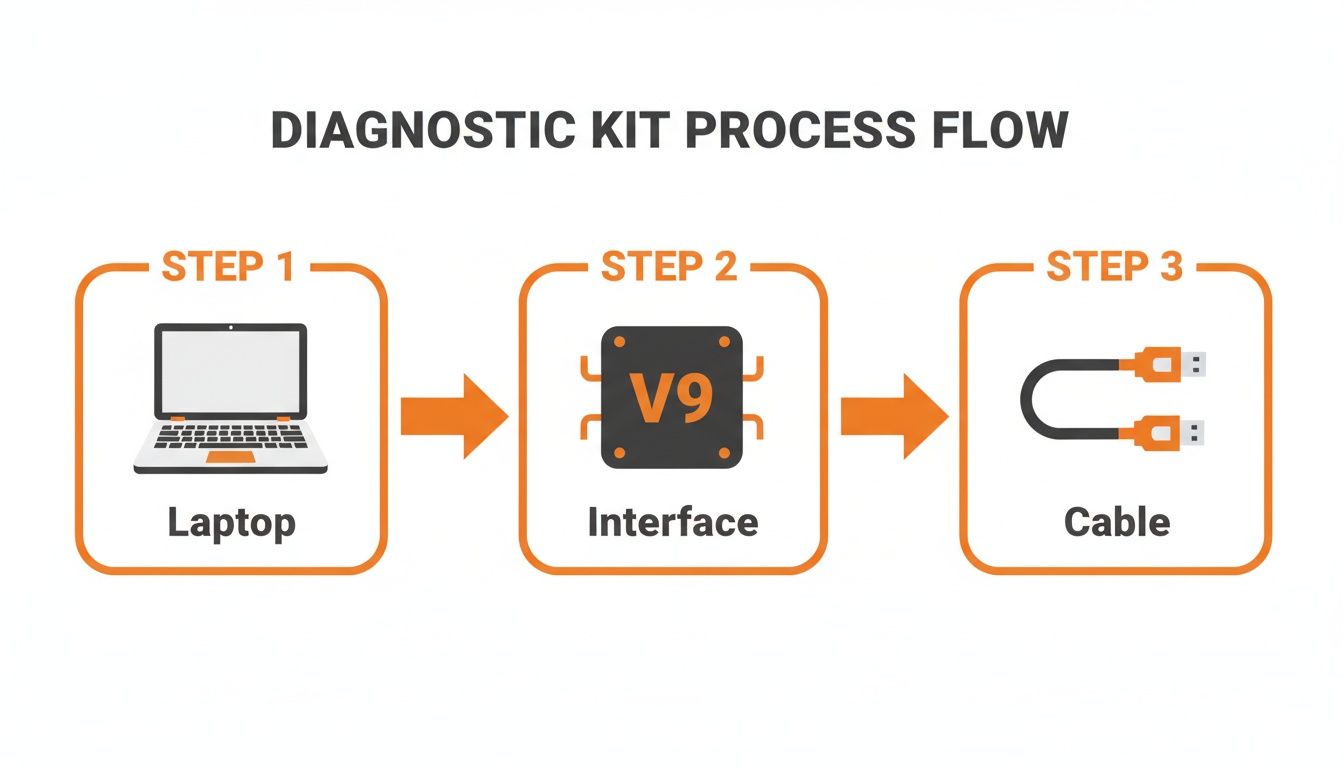
It's a three-part system: your laptop, the Jaltest Link V9 interface, and the right cable. A weak link in that chain and the whole thing fails.
Navigating the Jaltest Software
Once you're plugged in, fire up the laptop. Jaltest is powerful, but it’s not idiot-proof. Don't just start clicking around.
Select the manufacturer (JCB), then the specific model. This is critical. Telling the software you're hooked to a 540-170 Loadall when you're on a 535-95 can cause all sorts of communication errors. Be precise.
Jaltest will show you the different electronic systems on the machine. You're looking for the main vehicle controller or instrument cluster. That's where the password lives. Connecting to the engine ECU won't help you with a password problem.
The most powerful tool in your box is Jaltest's 'Expert Mode.' This is not a toy. This is where you access the same protected functions the dealer uses. Password resets live here.
To get into Expert Mode, you'll need a security code that changes. It's a safety feature to keep a clueless operator from turning a half-million-dollar machine into a boat anchor. It's one extra step that saves you from disaster.
Executing the Password Reset
Let's run a real scenario. A 3CX backhoe is locked out. Operator forgot the code. Here’s the fix:
- Connect and Identify: Hook up your kit, fire up Jaltest, and select the correct 3CX model.
- Access the System: Navigate to the instrument cluster or vehicle controller. Let Jaltest connect and pull the codes.
- Enter Expert Mode: From the system menu, select "Expert Mode." Punch in the security code when it asks.
- Find the Reset Function: Inside Expert Mode, look for something obvious like "Password Reset," or "Clear User Passwords."
- Execute and Confirm: Select the reset function. The software sends the command to the ECU, and a few seconds later, the old password is gone. It will either revert to a default (like "0000") or let you set a new one on the spot.
Cycle the key. The password screen should be gone.
You just did in 15 minutes what would've cost you two days of downtime and a fat bill from the dealer. That's the power of having a tool like the Bobcat dealer password reset tool jaltest for your own brand of equipment.
Troubleshooting Common Connection and Reset Issues
Nothing ever goes perfect in the field. When your Bobcat dealer password reset tool jaltest setup refuses to talk to your JCB, don't start kicking the tires. Ninety percent of the time, it's something simple and stupid.
Before you blame the software, check the power. A machine with a weak battery is the #1 cause of connection failures. The ECU needs a solid 12 volts to communicate; anything less and it gets dementia. Put a multimeter on the terminals first. It’s a five-second check that will save you an hour of cussing.
Diagnosing the Connection Failure
If the battery's good, look at your cables. The problem is usually right in your hands.
- Wrong Cable: Are you sure you grabbed the 9-pin Deutsch and not something that just looks like it? Easy mistake when you're rushing.
- Blown Fuse: The diagnostic port is on a fused circuit. Some operator probably plugged a cheap phone charger in and popped it. Check the fuse panel.
- Damaged Pins: Look inside the machine's port and your cable connector. One bent or corroded pin is enough to kill the whole connection.
This is what you want to see—a clean connection in Jaltest, showing it's talking to the machine.
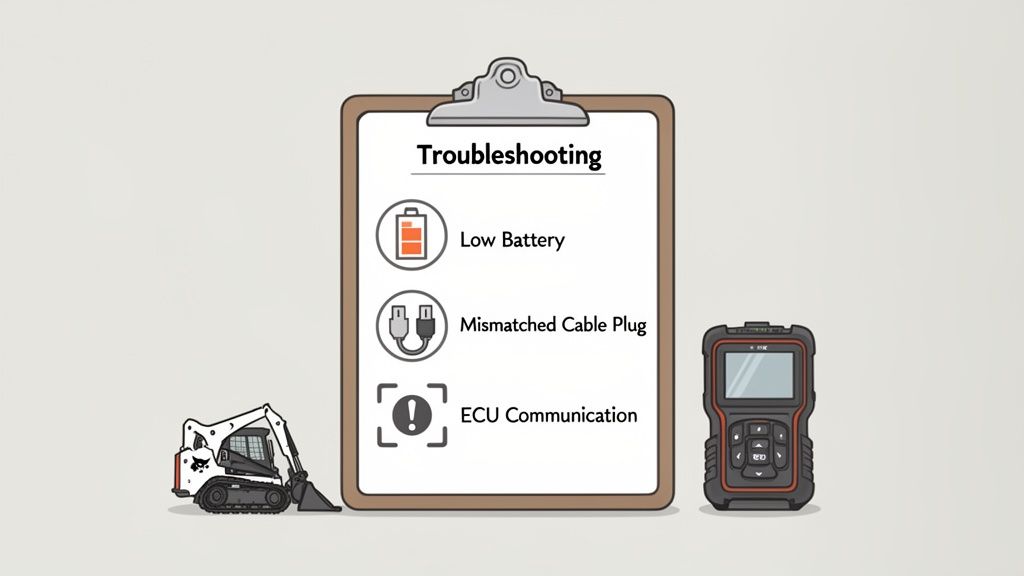
If your screen is just throwing errors, there's a break in the chain between your laptop and the machine's brain.
Translating Cryptic Error Messages
Jaltest is smart, but its error messages can be vague. The one you'll see most is 'ECU Not Responding.' This isn't a dead end; it's a big clue. The machine is telling you it can't hear you.
'ECU Not Responding' means stop messing with the software and check your hardware. It’s almost always a bad connection, low power, or a fried ECU.
When you see that message, run this checklist:
- Confirm battery voltage is over 12V.
- Double-check you're using the right cable for that JCB.
- Inspect the port and cable for bent or dirty pins.
- Make sure the key is ON. Sounds dumb, but it happens.
Following these field-tested steps will fix 90% of your connection problems. This is about being a methodical technician, not just a guy who plugs things in.
Beyond the Reset: Developing Smart Security Practices
Getting the machine running is the battle. Winning the war is making sure it doesn't happen again.
Using Jaltest like a Bobcat dealer password reset tool jaltest on your JCB gives you dealer-level power. You need to use it responsibly.
Just deleting the password and walking away is lazy. You're leaving a $200,000 machine open for any idiot to start up and wreck. You have to think about what comes next.
Building a Smarter Security Protocol
After a reset, your first move is to set a new, smart password. Don't use "1234" or the last four of the VIN. That's asking for trouble.
Create a logical system for your fleet. Document it in a secure logbook in the shop, not on a greasy sticky note in the cab. This one step will eliminate most of your future "I forgot the password" calls.
A password reset is a bandage. A smart password policy is preventative medicine. Treat your machine's security like you treat its oil changes.
Use Jaltest to set up unique operator profiles. Assigning different passwords to different guys is a game-changer. If a machine gets torn up, you know exactly who was running it. This isn't about being Big Brother; it's about accountability. It's crucial for safety and insurance. Our guide on job site safety protocols can help you build a safer site.
Keeping Your Tools and Machines Secure
Your diagnostic laptop is now a master key to your entire fleet. Protect it.
Always password-protect the laptop itself and never leave it sitting in the open on a job site.
Keeping your Jaltest software updated is also mandatory. The updates aren't just for new models; they include security patches that protect your tools, and your machines, from being compromised.
The risks are real. Guys are getting smarter about hacking these systems. Using tools like Jaltest and common sense security practices is the only way to stay ahead of the game and keep your iron secure.
Frequently Asked Questions From the Field
Alright, let's cut the crap. When you're standing in the mud with a dead machine, you need straight answers. Here are the questions I get all the time from other techs trying to use Jaltest as a Bobcat dealer password reset tool jaltest equivalent for their equipment.
Can Jaltest Reset the Password on Any JCB Model?
It’s damn good, especially on the newer Tier 4 stuff, but it's not a skeleton key for every JCB ever made. It’s strongest on the modern iron you see on job sites today. For some old clunker from the 90s, you might be out of luck. The key is keeping your Jaltest OHW (Off-Highway) license current. Cojali is always adding new coverage, and if your subscription is active, you'll have it.
Will Using Jaltest Void My Warranty?
This is the big one. Using a third-party tool is perfectly legal. But, the dealer will try to void a warranty if they can prove what you did caused the failure. For a simple password reset? They can't prove a thing. You're just regaining access. The risk comes when you start playing cowboy in "Expert Mode"—deleting DEF systems or cranking up engine parameters. Stick to the password reset, and you'll be fine, especially if the machine is out of its initial warranty anyway.
A dealer is always looking for an out. Resetting a password is safe. Rewriting the engine's DNA is asking for a fight you will lose.
What if the Reset Works but My Machine Still Won’t Start?
If you reset the password and it still won't fire up, that's good news. It means you just found out the password wasn't the real problem. The lockout was a symptom, not the disease. Now the real work starts. Use Jaltest to pull the real fault codes from the engine or hydraulic system. Is a sensor dead? Is the fuel system failing? The password reset just got you in the door; now you have to be a real technician and diagnose the actual problem.
If you're stuck and need a second opinion from a tech who's been there, get in touch with our team of techs. We speak your language.
When you’re tired of the dealer runaround and need sensors, solenoids, filters, and diagnostics that actually work, Flat Earth Equipment has your back. We get you the right parts the first time, with tech support that understands yellow iron. Visit us at https://flatearthequipment.com.